How to catalogue your home library
Catalogue your home library with a simple record, reliable edition details and shelf locations, then keep it useful with a small routine.
You know you own that book. You can picture the cover, perhaps even remember where you bought it. Finding it is another matter. A home-library catalogue closes that gap: it tells you what you have, which copy you have and where to look for it.
You can build one in a notebook, a spreadsheet or a dedicated app. The method matters more than the tool. Start with a small, useful record, give your shelves clear names and make adding the next book an easy habit. You do not need to finish the whole house before your catalogue starts helping you.
1. Decide what you want your catalogue to do
Write down the questions you actually ask about your books. “Do I already own this?” needs a searchable title and author. “Where did I put it?” needs a location. “Which translation did I read?” needs edition details and the translator’s name.
These questions set the scope. You might catalogue every book in the house, just your own books, or a shared family library. Decide whether ebooks and audiobooks belong in the same list, and keep books you want to buy separate from books you own. Borrowed books can have their own status so they do not quietly become part of the ownership count.
2. Choose a tool you will keep using
A notebook is a comfortable starting point for a small library. Leave space for additions and use an index if you want to find entries quickly. A spreadsheet is useful when you want to search, sort and choose your own columns. A library app can reduce typing through ISBN lookup and make cover browsing convenient.
Before committing, try ten books: a recent paperback, an older book without an ISBN, a translated work and two editions of the same title. Check how your chosen tool handles each one. If you often browse bookshops, make sure you can consult the catalogue on your phone. If moving your data later matters to you, check the tool’s current export options before entering hundreds of records.
3. Start with a few dependable fields
For the first pass, record enough to identify and find the book. Add detail when it serves a purpose. A manageable starting structure looks like this:
| Field | What to record |
|---|---|
| Title and author | Include the subtitle or volume number when needed to distinguish the book. |
| Edition | Publisher, publication year of this edition, language and format; add the translator for translated books. |
| ISBN, if present | Copy the identifier printed for the edition you hold. |
| Location | A shelf or box name you can recognise, such as Living room A2. |
| Reading status | Choose a short set, such as Unread, Reading and Read. |
| Copy details, if useful | Quantity, a dedication, condition or a loan note. |
Here is a deliberately small example. The locations and reading statuses are illustrative:
| Book | Author | Location | Status |
|---|---|---|---|
| Arthur: The Seeing Stone | Kevin Crossley-Holland | Living room A2 | Unread |
| Gatty’s Tale | Kevin Crossley-Holland | Living room A2 | Read |
| Norse Myths | Kevin Crossley-Holland | Study B1 | Reading |
Optional fields can wait: purchase date, price paid, series order, subjects, favourite passages or a link to your reading notes. Leave an uncertain year blank or mark it “to check”. Guessing makes the catalogue look complete while making it less trustworthy.
4. Work through one shelf at a time
Choose a shelf you can finish in one sitting. Put your phone or laptop beside it and work from left to right. Take one book, enter or look up its details, check the record, give it a location and return it to the shelf. Keep a temporary marker where you stopped.
Leave the rest of the room as it is for now. Emptying every bookcase turns a small recording job into a much larger sorting job. If an awkward volume needs research, put it on a short “to check” list and continue. Finish the straightforward entries before returning to the mysteries.
When the shelf is done, count its physical books and compare that number with the copies you recorded. The totals should make sense, including any deliberate duplicates. This is a good moment to catch a skipped book or an entry added twice.
5. Check the edition, even when a lookup finds a match
An ISBN identifies a particular edition and format; it does not identify your individual physical copy. Different language editions and formats receive separate ISBNs, while an unchanged reprint can keep the same one. The International ISBN Agency explains the identifier, and its assignment guidance covers editions and reprints.
Use the number on your book, then compare the result with its title page and publication details. Check the author, publisher, language, binding and volume. A familiar cover is a useful clue, but it is not enough on its own. A copyright date for the original work is also different from the publication year of the edition in your hand.
For an older book without an ISBN, enter the details manually. Do not borrow an ISBN from a modern edition just to fill the field. For a box set, note whether your record describes the whole set or one volume; choose a consistent counting rule. Keep distinct editions separate, and record multiple identical copies as a quantity or as individual copy records, depending on your tool.
6. Give your books locations you can follow
You do not need a library classification scheme to find a novel at home. A location such as Living room A2 can mean bookcase A, second shelf from the top. A label such as Box 03 works for stored books. Write down the convention once so everyone in the household reads it the same way.
You can still arrange the shelves by author, subject, size or whatever feels comfortable. The catalogue connects the book to that arrangement. If you move a stack to another room, update its locations while the move is fresh in your mind.
Keep location and reading status separate. “Unread” tells you something about your relationship with a book; it does not tell you where the book is. Use a few consistent subject labels too: choosing either “Cooking” or “Cookery” is easier to maintain than using both by accident.
7. Make a small routine for changes and backups
Add a new purchase when it arrives, before it disappears into a pile. When you lend a book, record the borrower and date in your chosen tool or a separate loan list, and clear the note when it comes back. When you give a book away, update its ownership status or remove it from your current inventory.
Keep another copy of the work you have done. Back up a spreadsheet somewhere separate from the working file; photograph a paper catalogue periodically. For an app, check its available backup or export facilities. Keep useful receipts and photographs separately where appropriate. A single copy on one device is easy to lose.
Once a month, check a handful of records against the shelf. Look for books that moved, loans that returned and new purchases waiting to be entered. A ten-minute tidy-up is easier than reconstructing a year’s changes from memory.
Your first session: one shelf, ten books
If the whole project feels large, start here: choose your tool, write down your minimum fields, name one shelf and record ten books. Look up one of those titles in your new catalogue and use the location to find it. That simple test tells you whether your system already works. Make any small adjustments, then continue along the shelf next time.
How ShelfAtlas can help you catalogue your home library
If you prefer an app, you can use ShelfAtlas for the same process. The screenshots below come from a small example collection on our website. The general method above works whichever tool you choose.
1. Create a book collection
After signing in, open My collections and choose Create collection. Select Books, give the collection a recognisable name and save it. Each collection holds one type of item, so choose Books at the start.
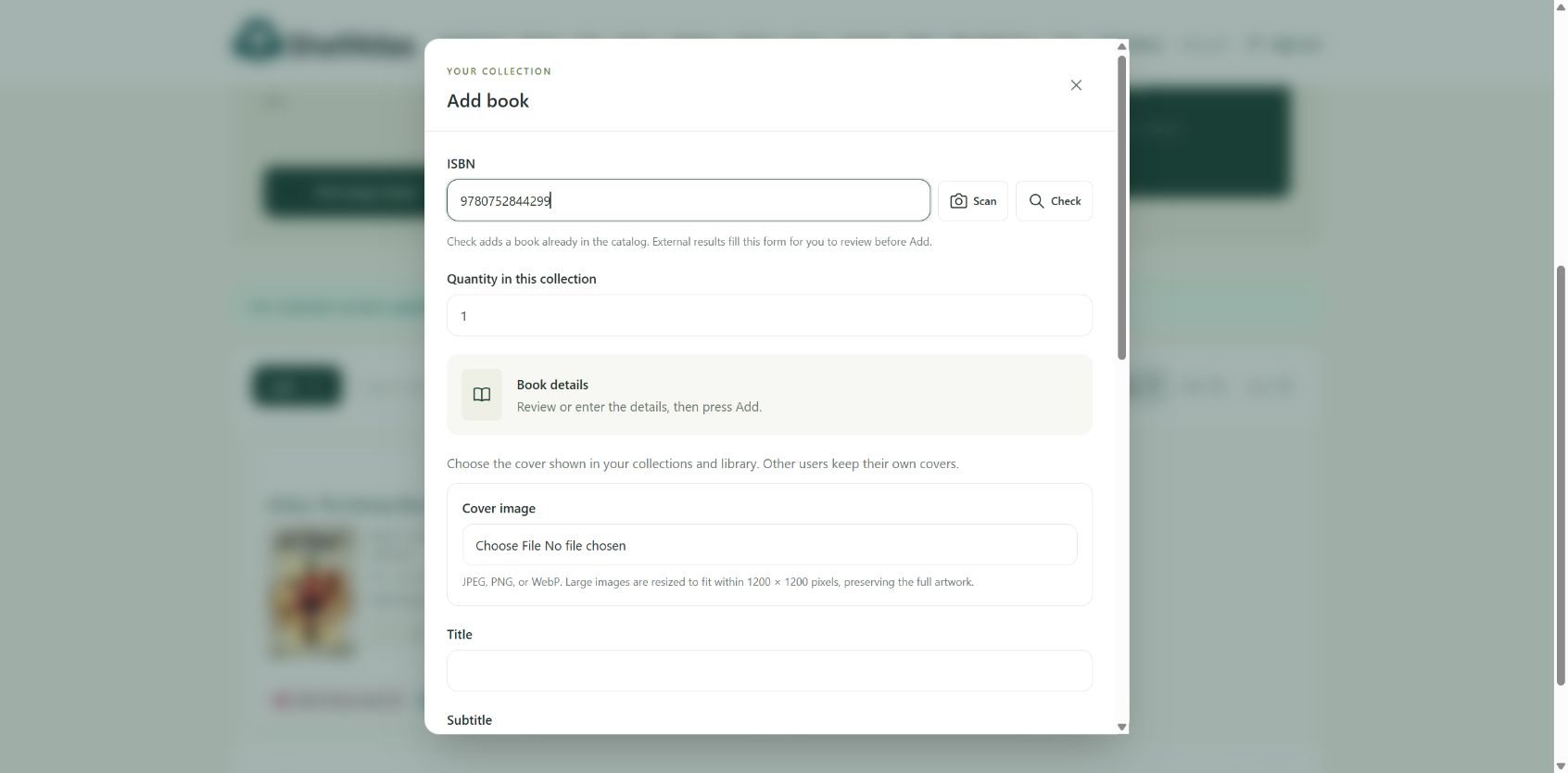
2. Add books by ISBN, or enter the details yourself
Inside the collection, choose Add. Enter an ISBN and choose Check, or use Scan with a supported camera and allow camera access when prompted. Check can add a book already in the shared catalogue directly to your collection. An external result fills the form for you to review before choosing Add. Inspect the saved book against your copy and the edition checklist above. When a lookup does not find the right book, enter its details manually.
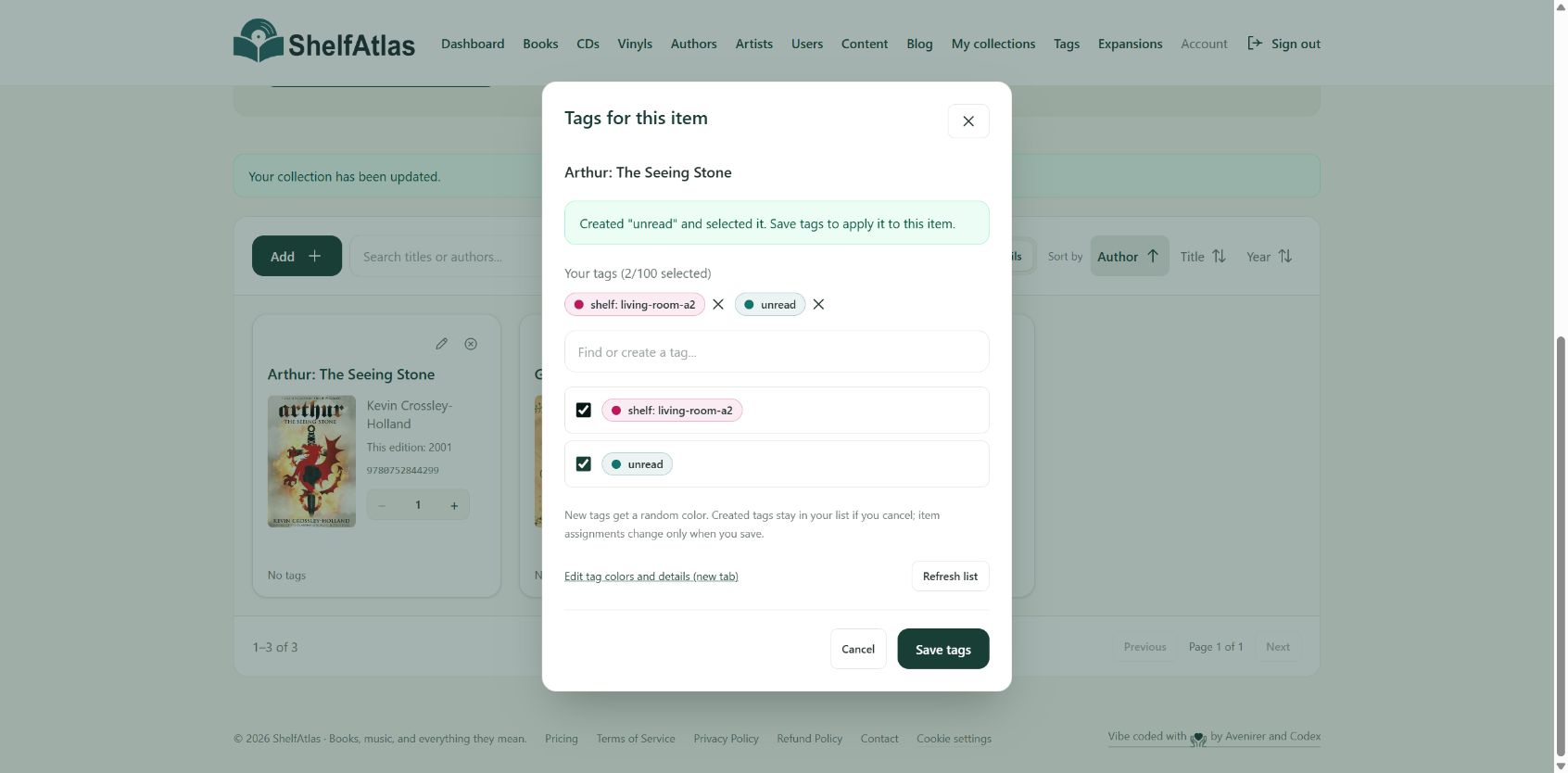
3. Add a shelf tag and a reading-status tag
Open the book’s tag control. In Details view, it is labelled Edit tags. Create or select a label such as shelf: living-room-a2 and a separate label such as unread, then choose Save tags. These are personal labels you define; use the same spelling across your books.
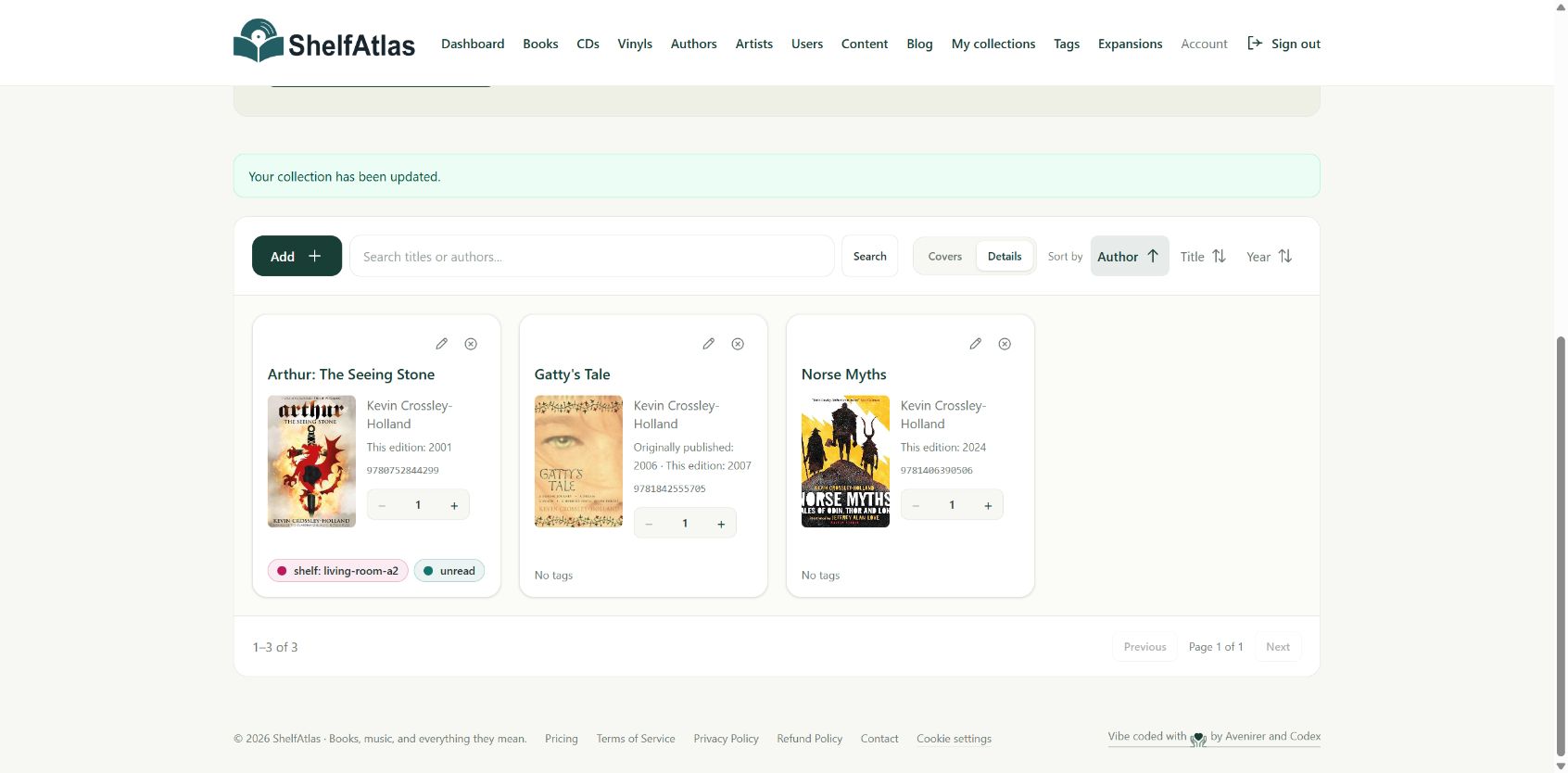
4. Find a book and keep recording
Use the collection search to find titles or authors. Switch between Covers and Details, and sort by author, title or year. If you own several identical copies, check the quantity; keep different editions as distinct entries. Work through the next shelf using the same short routine.
You can create a ShelfAtlas account or sign in to your existing account. For more help checking editions, see our guide to ISBN lookup.